South Carolina Law Enforcement (SLED) released dashcam footage of a shooting that happened in April on I-85 in Anderson County.
— Mrgunsngear (@Mrgunsngear) June 24, 2026
Austin Robertson (32) fought the officers then reached into his vehicle and pulled out an AR15 pistol (no brace of course…) and shot Deputy Alex… pic.twitter.com/MVMgj0z1Nq
Account and INFO Security
Now for the Software
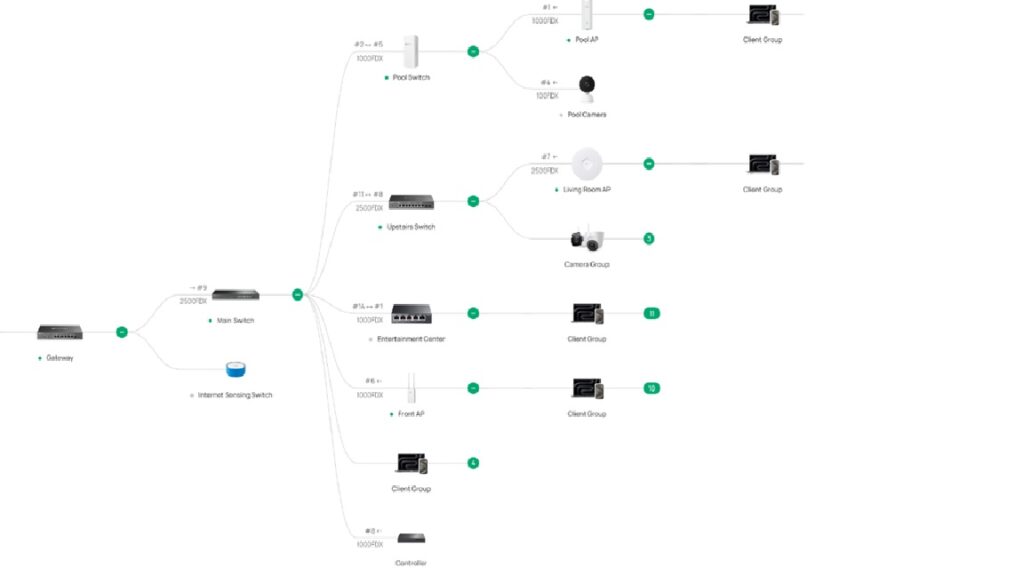
The hardware of the entire new network is in place. Some of you asked for a system diagram. Here is the wiring diagram for the new network:
Now that that is finished, we needed to install the ACL’s and rules. The VLANs are:
- Trusted 10
- IoT Devices 30
- Servers 40
- Guest 50
- Cameras 60
- Network Infrastructure 90
So the rules are simple. This controller handles rules higher in the list as being higher priority. For that reason, you list exceptions first, and general rules second. With that being said:
- Permit Guest network clients to contact the printer
- Allow my Zigbee hub to contact the server (TCP only)
- Allow Trusted Devices to contact Infrastructure
- Allow Cameras to contact Server
- Allow Trusted Devices to call Server
- Deny Guest network to all other networks
- Dent IoT network to all other networks
- Deny Cameras to other networks
- Deny Cameras to Internet
- Deny other networks to Infrastructure
That is the network. I set the network up like this, and everything seems to have been working well for the past week. I am sure that I will add other rules as things go on, but that is what I have for now. Once a week, the entire contents of the server are encrypted and sent to a backup server that’s stored in the house of a friend. That way, I have a copy of everything important in the event I lose access to all of my data here. Since it’s the Internet, that person and my backup data can literally be anywhere.
Then I installed AdGuard, which is my own private DNS running on the server. It allows me to control which clients on the network can interact with my network. It lets me block malware, spyware, and all sorts of advertising. About 30% of the DNS requests originating from my house are things I don’t want phoning home.
There is a VPN built into the system that allows me to hide my traffic from as many people who don’t have reason to see it as possible.
Then the surveillance software went in. The software was Surveillance Station and is running on the Synology rack server. It is recording a single PTZ and several fixed cameras, all in 8mp. It’s been running for ten days and I haven’t even used 2tb of my 7.8tb of storage so far. I think I have plenty of recording time. My goal was for 30 days’ retention, but it looks like I will get more than 60 days out of it.
Then there is physical security provided by Home Assistant. That includes sensors for motion, doors and windows, as well as a link to my smoke detectors. Different events cause different actions. Motion in a give area causes Home Assistant to take a snapshot of the area through the nearest security camera and send it to my cell phone as a text message. It can remind me that I forgot to close the door on the way out, other things like that.
The best part is that all of it, every piece, is owned by me. Amazon doesn’t decide to send my camera video to the cops. My ISP and their DNS server doesn’t need to know what websites I frequent. My devices don’t need to be reporting to data brokers what happens in my house.
Is it foolproof? Nope. Will it stop nearly all of the bullschnozzle? probably. Will it stop a determined, talented electronic wizard? Probably not.
It’s still far better than what I had three months ago. Now you know why I did all of the posts about data mining.
Account and INFO Security
There Is No Hiding Your Thoughts
I have people who comment that they don’t allow devices in their home to track them because their devices aren’t connected to the Internet. Obviously, if you are reading this, you are connected to the Internet in some way. That means you are being tracked. There is no avoiding it.
The internet many people imagine is a collection of websites. The internet that actually exists is a collection of websites layered on top of a hidden surveillance infrastructure.
When you visit a page, you are not just interacting with the site you intended to visit. You are also interacting with dozens of advertising, analytics, marketing, and data collection companies operating behind the scenes. Most users never see them, never consent to them in any meaningful way, yet those companies know far more about us than we realize.
Most people understand that websites collect data. If you shop on an online store, it’s reasonable to assume that store knows what products you viewed, what you purchased, and perhaps even what ads convinced you to buy.
What you may not realize is that some of the largest advertising companies on the internet may be tracking you even when you never visit those companies’ websites. The modern advertising industry is built on a vast network of invisible tracking technologies that follow users from site to site, quietly collecting information about their interests, habits, and behavior.
Imagine you’re reading a blog about home improvement. You never visit Amazon. You don’t click any ads. You simply read an article. What you don’t see is that the blog may contain a tiny piece of code provided by Amazon’s advertising network. (This blog does not permit advertising of any kind, so that isn’t an issue here, unless it’s being somehow done without my knowledge or consent.) As soon as the page loads, your browser contacts Amazon’s servers and sends information about your visit. This technology is commonly called a tracking pixel, web beacon, or advertising tag.
The pixel is often invisible. It may be a 1×1 transparent image or a script that runs silently in the background. Yet it can tell advertising companies:
- Which website you visited
- Which page you viewed
- When you visited
- Your IP address
- Your device type
- Your browser version
- Whether you’ve been seen before
The result is that companies can learn about your online behavior without you ever intentionally interacting with them.
The Myth of “I Never Gave Them My Information”
Many people assume that if they never create an account with a company, that company cannot build a profile about them. Unfortunately, that’s not how modern tracking works, advertisers don’t necessarily need your name to identify you. Instead, they assign identifiers to your browser or device. These identifiers may include:
- Cookie IDs
- Mobile advertising IDs
- Browser fingerprints
- Device fingerprints
- IP-based identifiers
Over time, these identifiers become associated with patterns of behavior. A profile begins to emerge:
- You read articles about hiking.
- You browse reviews of pickup trucks.
- You compare mortgage rates.
- You visit travel websites.
Even if your name isn’t attached immediately, the behavioral profile becomes increasingly detailed. Over time, the advertiser gets a pretty accurate picture of who you are and what you are interested in. Cookies get most of the attention because they’re visible and users occasionally receive cookie consent popups.
But some tracking techniques don’t rely on cookies at all. For example, browser fingerprinting collects characteristics about your device and browser, including:
- Screen resolution
- Installed fonts
- Operating system
- Browser version
- Language settings
- Time zone
- Graphics hardware
Individually, these details seem harmless, but combined, they create a surprisingly unique identifier. Think of it like recognizing a person from dozens of small clues rather than a single name tag. Even if you delete or refuse cookies, fingerprinting can sometimes recognize the same user each time they return. It’s becoming more and more sophisticated, and there is nothing that you can do about it except stay off the internet completely, and that may not even be a solution.
The real power comes from scale. You see, a single website knows what you do on that site but an advertising network embedded on thousands or millions of websites can observe behavior across the internet. If the same advertising company appears on multiple websites, it can potentially see that:
You visited a health website on Monday.
A car review website on Tuesday.
A financial planning website on Wednesday.
A travel booking site on Thursday.
Viewed separately, these visits seem insignificant. Viewed together, they reveal a great deal about your life, which is why people often feel like advertisements “know” what they’re thinking about. In reality, the advertising ecosystem may have observed enough behavior to make highly accurate predictions. That leads us to the reality of data brokers.
Tracking doesn’t stop with advertising platforms, because there are entire industries that exist to collect, aggregate, analyze, and sell consumer data. These companies, called data brokers, gather information from:
- Websites
- Mobile apps
- Loyalty programs
- Public records
- Commercial databases
- Marketing partnerships
The information can then be used to predict your buying habits, health concerns, and tons of other information. Most consumers have never heard of the companies creating these profiles, yet those profiles influence which ads they see, what offers they receive, and how businesses evaluate them as potential customers. It’s a huge business, and it’s what the new AI systems are being optimized for.
Constant surveillance has become the default business model of the internet. The problem isn’t merely that companies know what products you like, the problem is that detailed behavioral data can reveal:
- Political interests
- Religious beliefs
- Health concerns
- Financial circumstances
- Personal relationships
- Life events
Information that feels private can often be inferred from seemingly ordinary browsing activity, and that’s the uncomfortable reality of the modern advertising economy: some of the companies collecting information about you are companies you’ve never even met.
Your stuff doesn’t even have to be connected to the internet. Television broadcasts, radio shows, advertisements, and streaming content can contain embedded audio watermarks that are difficult for humans to notice. A smartphone app with microphone permission can detect these watermarks and determine:
- Which show you’re watching
- Which advertisement played
- When it played
Then report back to the “mother ship” and this exact method has been used for advertising attribution and audience measurement. You have just added to the file on yourself without even knowing it. The phone and TV aren’t directly communicating in a conventional sense; rather, the TV emits an encoded signal and the phone recognizes it.
The most famous air-gap compromise is probably the Stuxnet operation. That particular piece of malware reportedly spread through infected USB drives to reach systems that were intentionally disconnected from the internet. Once inside, the malware manipulated industrial equipment while concealing its actions. That attack demonstrated a crucial lesson: an air gap dramatically improves security, but it is not an absolute barrier.
Communication across air gaps including ultrasonic and near-subaudible signaling has been demonstrated by researchers, and some commercial tracking systems have used similar concepts for cross-device identification. Now that you know what advertisers are doing, what do you think the NSA is capable of?
My feeling on this? You can’t think about taking a crap without someone expecting you to reach for toilet paper.
Account and INFO Security
Earth shaking Network upgrades
Earthquake
Who had a Florida earthquake on their 2026 BINGO card? I know I didn’t, but we had a bit of earth shaking yesterday just after 1400, as a 6.1 Richter earthquake struck off the coast of Cuba. I was working at the time and the doctor, who was sitting next to me, said “Was that an earthquake? Did you feel that? I even saw the water in your cup shaking.” I didn’t notice, but I was preoccupied at the time. Sure enough, it was.
Damage
I don’t know if it was related or not, but I returned home to find my closet system had fallen off the wall. It looks like one of the screws pulled out of the wall, and this caused a cascading failure of the other screws, which caused an entire wall of the system to fall to the ground. There was some damage to it, forcing me to order $500 worth of parts. I am going to reinstall a 3/4″ plywood backer board this time. That way, I can use more screws when I secure it to the wall. The parts won’t be here until next Monday, so I will spend the day today taking the old one apart and reclaiming any undamaged parts I can find.
Network Upgrades
The network hardware is installed. I setup a few VLANs, which allows me to split the home network into segments:
- Infrastructure
- IOT devices
- Servers
- Guests
- Surveillance
Once that was done, I created rules that allow me to control traffic. As an example, the guest network can’t do anything but access the Internet and a printer. The cameras are in the surveillance network, and they can only contact the server that’s running the surveillance software. IOT devices can’t do anything but contact the Internet.
As time goes on, I will tighten up the rules to make things as secure as possible. For now, the system works and I have tested it to make sure the rules are operating as intended. Starting later this week, I will begin installing security cameras. There will be a post on that.
Account and INFO Security
Net Security
One of the big problems with IoT stuff is net security. The things we are buying are gathering information and sending it out to who knows where. In 2015, Samsung issued a warning to consumers not to discuss personal information within earshot of its televisions because the TV was listening, recording, and passing along what it hears. Google has had similar problems with its own stuff.
For those of you who are IT nerds, some of this stuff will seem basic- my apologies, I am still learning, and I assume that a good number of the people who read this blog are as well.
IoT devices are notoriously insecure because manufacturers frequently prioritize low costs and rapid production over robust security. These devices often suffer from weak default credentials, a lack of encryption, and limited hardware capacity for security software, making them easy targets for hackers to hijack and form botnets or even to spy on you and sell your information to others.
Using VLANs can help with that. A virtual network, or VLAN, allows you to maintain separate, distinct networks within your physical network. These virtual networks are like tiny virtual containers that cannot talk to or even see each other, but can be configured to communicate as much or as little information between each other as you desire. That’s where the security comes in.
By creating different ‘trust’ levels within your home network, you can create a system whereby those who are inside of your guest VLAN can only communicate with the Internet or your printer, but nothing else. This prevents a guest from snooping through your files, accessing your router controls, or other mistakes. Placing all of your IoT devices in another VLAN will keep them isolated from other parts of your network and allow you to control where and how much information they can send or receive. Trusted devices such as your cell phone or laptop can be configured to have no restrictions.
In short, it increases security by giving devices “need to know” access without giving them access to things they shouldn’t be accessing. That’s what this new system I am installing does. I setup a few different VLANs:
- Trusted. Devices within this VLAN will have IP addresses ending in 20.xx
- IoT devices. Devices within this VLAN will have IP addresses ending in 30.xx
- Storage. Devices within this VLAN will have IP addresses ending in 40.xx
- Guest. Devices within this VLAN will have IP addresses ending in 50.xx
- Cameras. Devices within this VLAN will have IP addresses ending in 60.xx
Each IP range can then be assigned any number of permissions. For example, IP addresses ending in 50.xx are setup to only be able to access the Internet and a printer. Guests will therefore be allowed to print or surf the Internet, but that is all.
So that is the plan for our network security here at the Ocho. Will it stand up to determined hacking or the NSA peeping at my stuff? Of course not. Is it better and more robust than what I have had in the past? Certainly. Perhaps it will cause those devices and people with nefarious intent to look elsewhere for lower hanging fruit.
Now if you will excuse me, today is going to be a pleasant, breezy 84 degrees, so I am going to go mow the lawn.
Account and INFO Security
Learning as I Go
I am not an IT expert by any stretch of the imagination. Still, I am doing OK with this server upgrade. Some of these concepts are new, some not so new. Still, I am doing alright with the upgrades. I spent the day installing some upgrades.
Mounting
I first tried to mount the cabinet, but it was designed for studs that are 16 inches on center, and my walls have 24 inch stud spacing. I cut me two 1×6″ Spruce boards 26 inches long. I drilled them for screws to attach to the studs, and also drilled 5/16 holes 16 inches apart, then I drilled a countersink centered on those holes. Those holes fit a 5/16 bolt and washer. I painted the boards to match the wall, then attached them to the studs with 4 #8x 3″ wood screws at each end of the board.
Now I had two boards spanning the studs with 5/16″ bolts sticking out that matched the mounting holes on the cabinet that allowed me to bolt the cabinet to them.
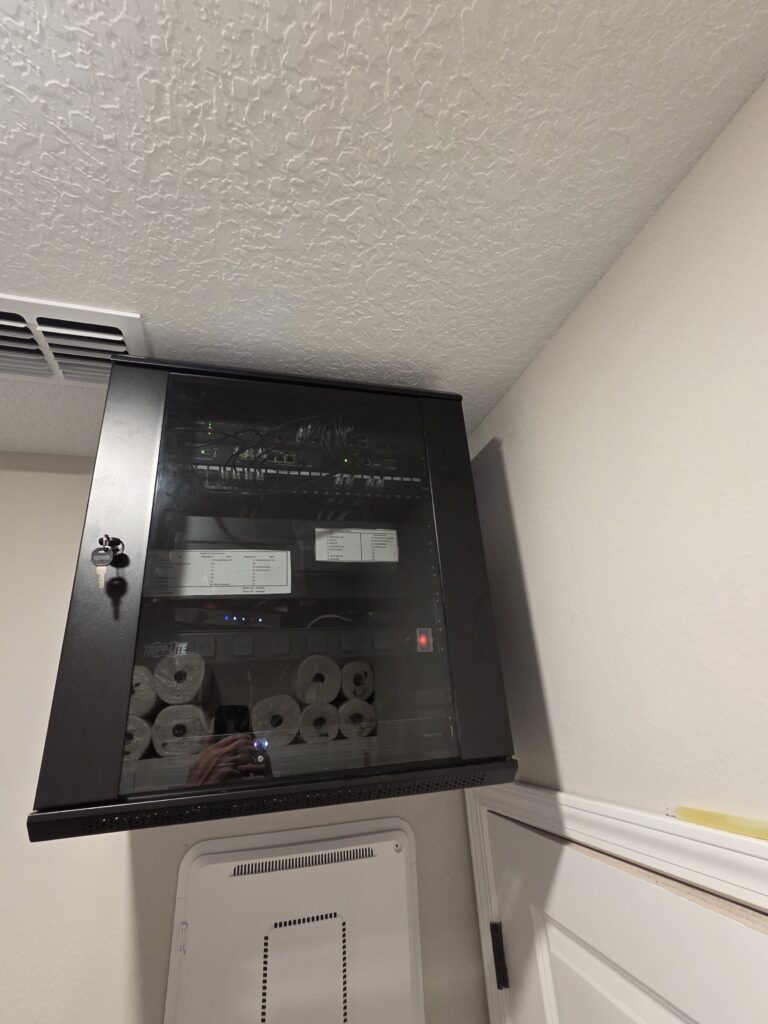
If you look below the cabinet, you can see the old onQ panel this cabinet is replacing. Once all is done, I will remove it and drywall over the hole. Yeah, the reflections in the glass show the toilet paper and paper town reserves I keep on top of the laundry room cabinets.
Installing Equipment
I put a thermostat in the cabinet that will control the exhaust fan. Then I attached my devices to the racks:
- 12U Omada SG3218XP-M2 POE managed switch. This is the main switch for my network.
- 11U Omada ER707-M2 gateway & OC220 Omada controller
- 10U Keystone 24 pin patch panel. Ports1-5 are reserved for Infrastructure connections like modem, UPS, Moca, 6-15 are for POE devices like AP’s, 16-18 are for non powered devices, and 19 thru 24 are for cameras
- 9U is a SG2210XMP, currently an unused switch but I plan on having it be the switch for my future IP security cameras
- 8U, 7U, 6U are open.
- 5U is a shelf with a Moca unit, the modem, and a switch that cycles power to the gateway and modem in the event it cannot access the Internet
- 4U is a power distribution unit
- 3U and 2U are currently vacant, but will have a Synology RS1221+ as a storage drive and for future cameras
- 1U is a 500 watt UPS. I know it’s small for what I am powering, but I am only using it to bridge the second or two that it takes my Powerwalls to take over when grid power fails.
I got everything wired and labeled. The network is fully functional and stable, and the entire thing went as smoothly as I could have hoped. It took me longer to mount the cabinet on the wall than it did to get the network up and running. I now no longer have a home level network. This is bordering on prosumer level stuff.
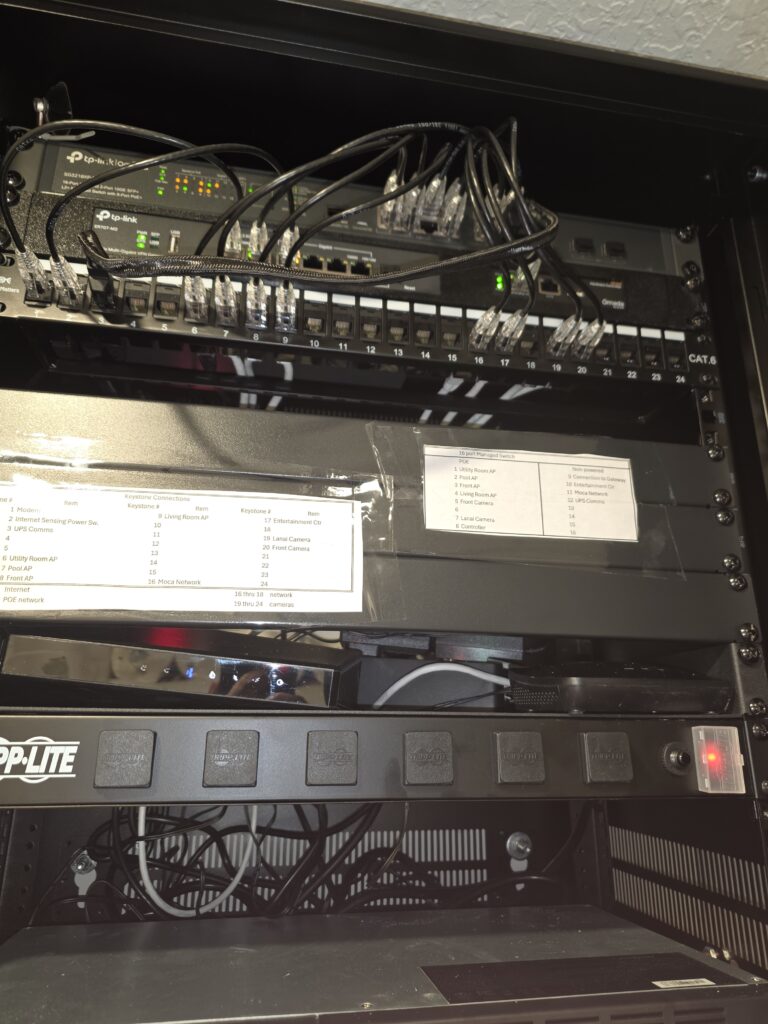
You will note the empty slots for the second switch and the double drive server. Im waiting on parts for those. I will also neaten up the wires a bit.
Setting Up Virtual Networks
The last thing I did today was set up several VLANs:
- Management, VLAN 10
- VLAN 30 for IOT devices.
- Servers, VLAN 40
- Guest Network VLAN 50
- Security Cameras, VLAN 60
To verify that it works, I logged in to the guest network SSID and was assigned an IP of 192.xx.50.x. I haven’t created rules yet, just wanted to make sure I did it correctly.
Moving Forward
Tomorrow, I will install the disk server, a Synology RS1221+. I don’t have disk drives for it yet, but that’s coming. Once that is installed, I will begin to place devices and clients into the various VLANs. Once that is sorted, I will begin assigning rules. One step at a time.
I am not planning on working on or installing cameras until the weather cools enough for me to get in the attic and run more Ethernet cables, so not until at least October or November.
Account and INFO Security
Data Infrastructure and Prepping
Records, communication, and security are all important parts of prepping. A robust computer network can work of all of those things. We’ve talked about the other sections of the prepping pyramid, but haven’t spent a lot of time on how we can use information technology to strengthen the other sections of the pyramid.
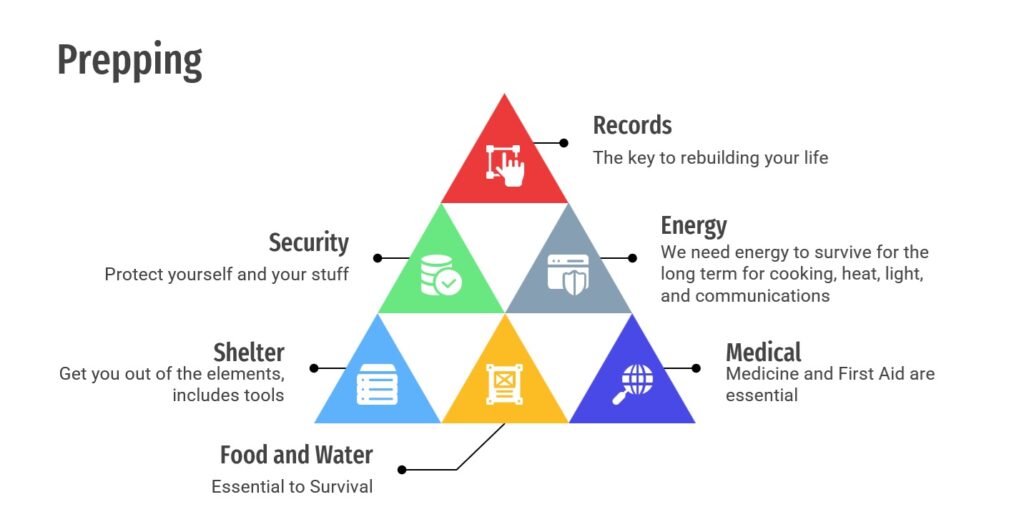
You may or may not remember that I changed my home network to an Omada system back in February. The Wifi coverage is excellent, but now there are other issues that I would like to take care of.
- I wasn’t happy with how crowded and sloppy the onQ panel that contains everything is. It looks like a bowl of spaghetti and even though I have the largest panel made, it’s still crowded.
- I am using Ring Cameras for surveillance, but I am not happy with them, for reasons that will be covered in a future post.
- I have a Terramaster NAS with four 4TB NvMe SSDs in it, but I can’t get those SSDs any more because they now cost 5 times more than they once did.
- There is a second setup in the bedroom I use as an office. It has an Omada switch, and it runs my office equipment. The issue is the UPS there just died, and I want everything consolidated, so I am moving that into the main server.
So I have decided to make a few changes. We are keeping the Omada system, but I am making a few upgrades.
- I am mounting a 12U server cabinet on the wall of the utility closet in the house. This will make things cleaner and easier to manage.
- I will be putting an 8 bay HDD rack in the cabinet. It will be used as both a NDVR and as a NAS device.
- Three rooms in the house are device dense: the living room, the master bedroom, and the office. I am going to clean up the architecture a bit to make things faster and more resilient.
So how are we doing this? Well, in the racks, there will be:
- A rackmount UPS. I just need enough storage to ridge the second or two it takes my powerwalls to take over when the power fails.
- Power distribution
- An Omada controller
- An Omada gateway
- A 24 port keystone patch panel
- An Omada 16 port managed POE switch
- an 8 bay rackmount HDD rack.
- A shelf where the modem will be, along with my current NAS (until the HDD rack is installed)
- There will be 4 remaining U for future additions
Records
Records are important. Having copies of things like financial records, professional licenses, certifications, and other important documents will allow you to rebuild your life in the aftermath of a large disaster. Ask the residents whose lives were destroyed in Hurricane Katrina how important those records were in doing that. Having a robust set of electronic records with copies of every important document, all in a RAID, is a great step towards that goal. I am thinking of at least 12TB of RAID storage space for important files. I need it, because I scan every document, bill, and receipt that comes into this house.
Security
One or two of the HDD bays will be reserved for surveillance hard drives. I am looking at 20TB or more of storage space for the camera system. Once the weather gets cooler, I am planning on running Ethernet cables in the attic for a PTZ camera, two outdoor wide view cameras, a doorbell camera, and one or two covering other areas of the property, all in 4k. So, a total of 5-6 cameras that will record 24/7. That takes up more storage space than my documents and files.
That’s the hardware. I will also have it organized into several VLANs for network security. There will be a VLAN for:
- One for infrastructure. This will allow APs to be on their own VLAN, as well as controllers and those sorts of things.
- IOT devices, so I can limit how much they will spy on the rest of the house. They will only access each other and the Internet.
- Entertainment devices like televisions and SONOS speakers. Internet only
- A Guest VLAN that will only have access to a printer and the Internet
- Then phones belonging to my wife and I that will have full access.
I will decide more on rules later, but that is the idea in my head for now.
Implementation
First step is to get all of the hardware installed and move the network that already exists into the server cabinet. Then I will setup VLANs. After that, we will install the HDD rack and move the NAS files there. I have another HDD based NAS that I can use as a backup file server.
SCUBA diving
Data Driven
One of the things I am drawn to, and quite skilled at, is processing data. It’s why I enjoyed operating a fire truck, and it’s also why I like my job in medicine and enjoy the technical end of SCUBA. I would probably been pretty good at engineering. I love processing data and doing math in my head. I also enjoy having a good tool that will make that job easier.
Enter dive computers. These machines take all of the guesswork out of diving. Traditionally, divers would use a table where the maximum depth and total dive time were looked up on a table that would tell you the maximum time you could be underwater. This is called “square profile” diving. The table assumes you descend from the surface to a set depth, remain at that depth the entire dive, then return directly back to the surface. In reality, no one dives like that.
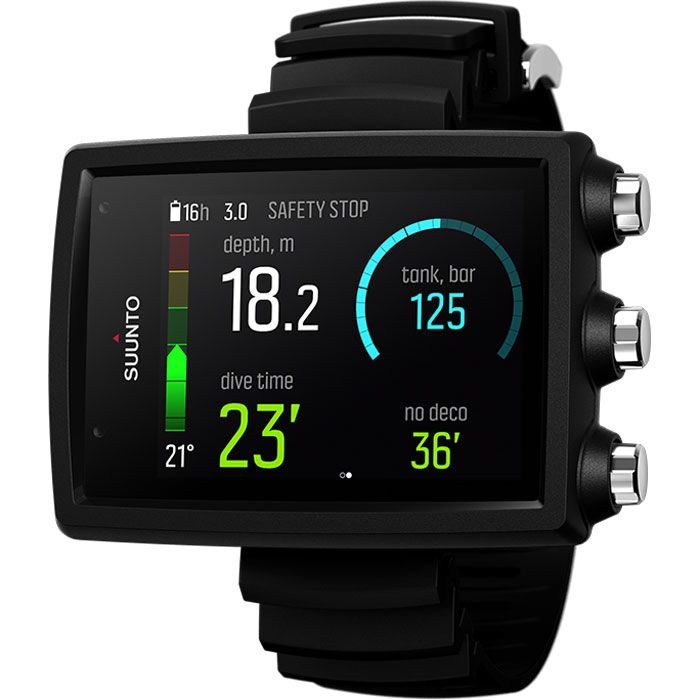
A dive computer uses a mathematical model to calculate how much Oxygen (and other gases) are in your tissues, then uses that to tell you what you need to do in order not to get the bends. It resamples the factors of the dive every 30 seconds.
That’s one of the things that I can’t understand about this diving accident. The diving computer would have warned them:
- that they were approaching the no decompression limit once they had been under for about 7 minutes at a maximum depth of 160 feet. It would beep and flash.
- When they reached 187 feet, they would have gotten another set of beeps warning them that the oxygen was at the maximum safe limit of 1.4 atmospheres of pressure
- Most computers have a depth alarm that would have warned them about exceeding depth limits
- Many computers have turnaround alarms that will warn you when you have used a third (or some other programmable amount of your air) of your breathing gas
- Many dive computers would have had their models exceeded and would go into “violation” mode. There are more alarms here, and the computer only functions as a digital set of gauges after that point.
In short, there is no way that dive was an accident, and that is not even considering the stupidity of swimming that far into a cave. It always astounds me that someone will pay a thousand dollars for an expensive piece of gear that’s designed to save your life, then will ignore that device. The cheapest dive computer can be bought for less than $100 (although I wouldn’t bet my life on cheapest.)
My dive computer cost me well over $600, but it is obsolete and no longer for sale. If I were to buy one today, I would want a gas integrated console computer that can handle multiple gas mixes on one dive. The small wrist ones aren’t readable by this old man’s eyes- the numbers are too small on the display and I don’t want to wear a prescription dive mask.
So with that being said, I would want:
- gas integrated
- nitrox capable to 100%
- multiple gases on one dive
With that, I my research settles on these:
- Apeks DSX Dive Computer:The nice thing about this one is it would let me upgrade to trimix if I decide to do that in the future. It’s pricy though: $1200. Also, the connection to your tank is wireless, and that means sometimes losing the signal and not knowing how much pressure you have left.
- Mares Genius: This one is cheaper at $800. Still has the wireless connection issue.
- Oceanic Pro Plus X: This one solves the wireless issue, but it only handles nitrox to 50% and can’t do trimix. It’s also pricy at $1200.
I’m sure there are others, but those are the ones I would consider.
The disclaimer: I don’t advertise, and receive nothing for my reviews or articles. I don’t think that I ever will. I have no relationship with any products, companies, or vendors that I review here, other than being a customer. If I ever *DO* have a financial interest, I will disclose it. Otherwise, I pay what you would pay. No discounts or other incentives here. I only post these things because I think that my readers would be interested.
SCUBA diving
Answers
From la Repubblica, a story of the deceased divers from the Maldives. A Finnish team managed to recover the final two deceased divers yesterday. All four of the remaining divers were located in the same chamber, more than 200 feet below the surface, and more than 300 linear feet inside the cave. The rescue team has given some insight into what happened to the missing divers. To understand what happened, a map of the underwater cave.
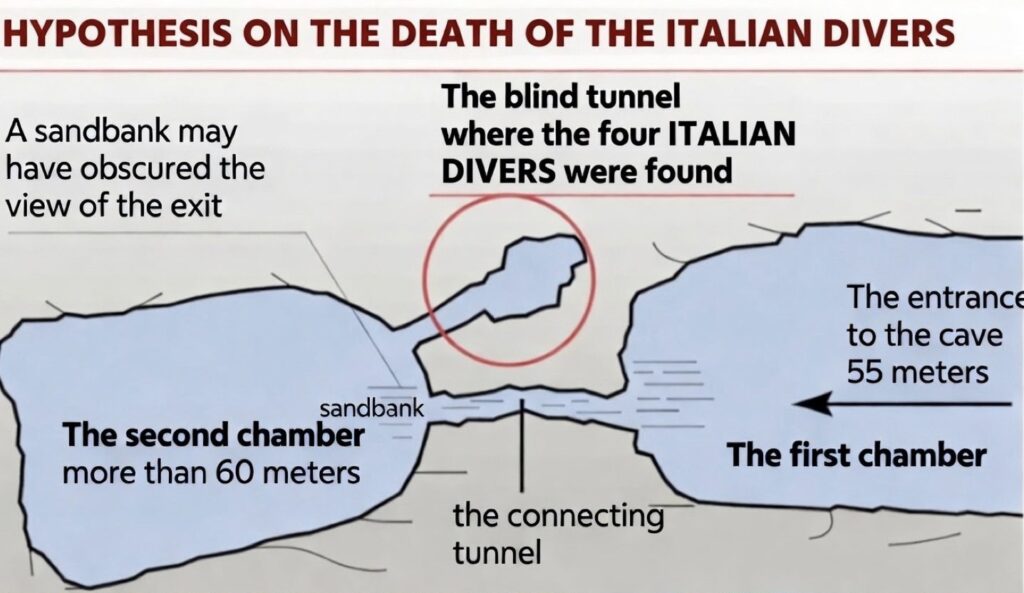
This is a diagram of the cave system, as seen from above, looking down. The divers entered the cave from the right, off of the frame.
The divers entered the cave system at a depth of 180 feet. The cave begins with a first large, very bright cavern with a sandy bottom. It would seem enticing to go further, as this looks very inviting.
They swam through a connecting tunnel from the first chamber to the second. This connecting tunnel is almost 100 feet long, ten feet across, and just three feet tall. It led to the second chamber of the cave, which is a large, round space with no natural light. This second chamber had a depth of over 200 feet. The interior of this chamber would be completely cut off from daylight, and the only visibility would be provided by any handheld lights that the divers had brought with them. The inside of such a chamber is a confusing jumble of rocks, with one rock looking much like any other rock. Even though the water in here was clear, it was a dark, confusing maze of rocks and sand.
At some point, they entered the third chamber (which was a dead end with no way out) through another tunnel whose entrance was right next to the connecting tunnel leading back to the first chamber and the exit. The Finnish team notes that the exit tunnel’s opening was partially obscured from view from the vantage point of a diver in the second chamber by a large pile of sand. It is easy to get over the sandbank into the second chamber, but when you turn around to leave again the bank almost looks like a wall, hiding the corridor from view. The team believes that the divers mistook the tunnel leading to the dead end and their literal death for the tunnel that would lead them to safety.
The divers were only equipped with 80 cubic feet of breathing air. At 200 feet, they would breathe through that supply at 7 times the rate of the surface. By the time they had penetrated the cave to that point, they likely had a minute or two of air left before they all drowned from lack of air.
This reinforces my opinion of what I think happened. These divers were diving beyond their training, experience, and equipment. Had they been properly equipped and trained, they would have stretched a guideline as they went and wouldn’t have gotten lost. They would have had more than just 80 cubic feet of breathing gas, and they wouldn’t be dead.
This was diver error, plain and simple. As I said before, the ocean is an outright jealous bitch, and she shows no mercy to those who do not give her the respect she deserves.
EDITED TO ADD
One of the things that gets me, although it shouldn’t at this point, are the social media experts who are claiming this team had tons of training and experience, so something else must have happened. I have seen theories ranging from “they had bad air” to rogue currents (although how a current runs through a dead end cave, they don’t explain), and even one that claims they were drug there by a large squid to be used as food.
I am not the only experienced diver who actually knows better. It doesn’t take any special disaster to have made this happen- just a combination of inadequate training and experience combined with arrogance of Dunning Krueger and a dangerous environment with a very small margin of error, and that’s all you need.
SCUBA diving
The Next Chapter
The SCUBA tragedy in the Maldives has another interesting turn, and one that actually supports my belief that the divers were diving far beyond their training, equipment and experience. The bodies of the four missing divers have been recovered, and they were located in the third chamber of the cave at a depth of 200 feet.
The Italian tour operator that manages the Maldives diving trip denied authorizing or knowing about the deep dive that violated local limits, its lawyer told Italian daily Corriere della Sera on Saturday, according to an AP report.
Orietta Stella, representing Albatros Top Boat, said the operator “did not know” the group planned to descend beyond 30 meters. Crossing that threshold requires special permission from Maldivian maritime authorities and the tour operator “would have never allowed it,” she said.
I want you to look at this short video of the equipment that the dive team is using to recover the bodies.
This setup is called a rebreather. It works by having the diver rebreathe the air in his lungs over and over again. The device removes CO2 from the exhaled air and adds oxygen as needed to maintain a safe mixture. These devices are the gold standard for diving at the edge of human physiology. This is closed circuit diving, and rebreathers are specialized equipment, costing tens of thousands of dollars for each.
Now consider what the divers who died were equipped with:
The Italian divers were experienced, but the equipment used appeared to be standard recreational gear rather than technical equipment suited for deep-cave diving, she said.
This is the part that I can’t confirm, but this is reportedly the cave where the group was diving. Even if it isn’t the exact same cave, this is what it would look like. These caves are covered in fine silt, and one wrong move, one errant fin kick sends that silt up into the water of the cave, reducing visibility to zero.
One of the things you do in an area where visibility is potentially poor is use guidelines. A guideline is a rope that leads you back to the exit. Firefighters, rescue personnel, and cave divers are all familiar with this. The line has markers on it to indicate direction so you don’t accidentally follow the line in the wrong direction. It looks like this:
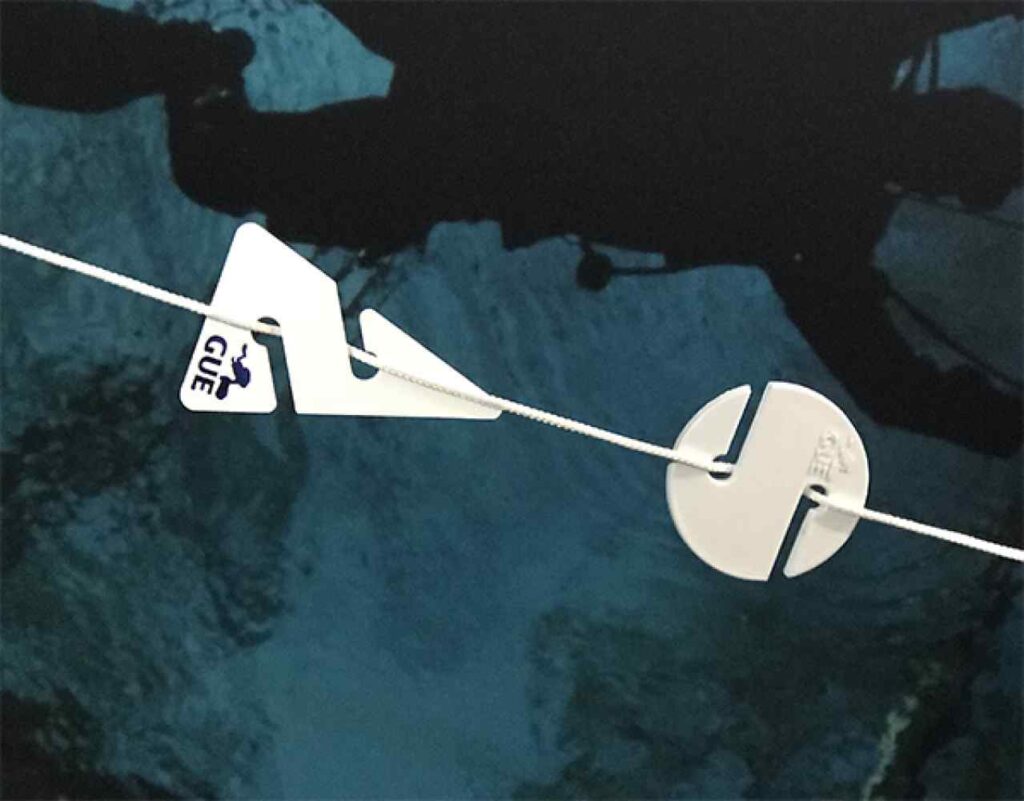
The round markers are called cookies, and the arrows are called, well, arrows. These shapes are easy to identify by feel in cases where there is no visibility. The arrow is placed on the line so it points to the exit. Unlike arrows, which explicitly point toward the nearest exit, cookies are round and do not point anywhere. They are used to mark other things. For example, if a cave branches off in different directions, the guideline will as well. So you use a cookie to mark which of the guidelines the team followed to go deeper into the cave.
In this case, it is evident that the divers didn’t use guidelines. They weren’t equipped for deep or decompression diving, and none of the divers involved were trained for this.
When that visibility is zero, you are weightless, it’s very disorienting. If you don’t know what you are doing in a cave, this is a death sentence. You have about 3 minutes to figure it out, or you and everyone with you in this cave is dead. That’s how 5 divers can die all at once. My guess is that this is what happened, and one of the divers managed to make it as far as the cave entrance before his air ran out. This has been my belief all along, and nothing I have seen to date contradicts my belief.
Now that the bodies have been located, the plan is to recover two of them tomorrow, and the final two on Wednesday.