The hardware of the entire new network is in place. Some of you asked for a system diagram. Here is the wiring diagram for the new network:
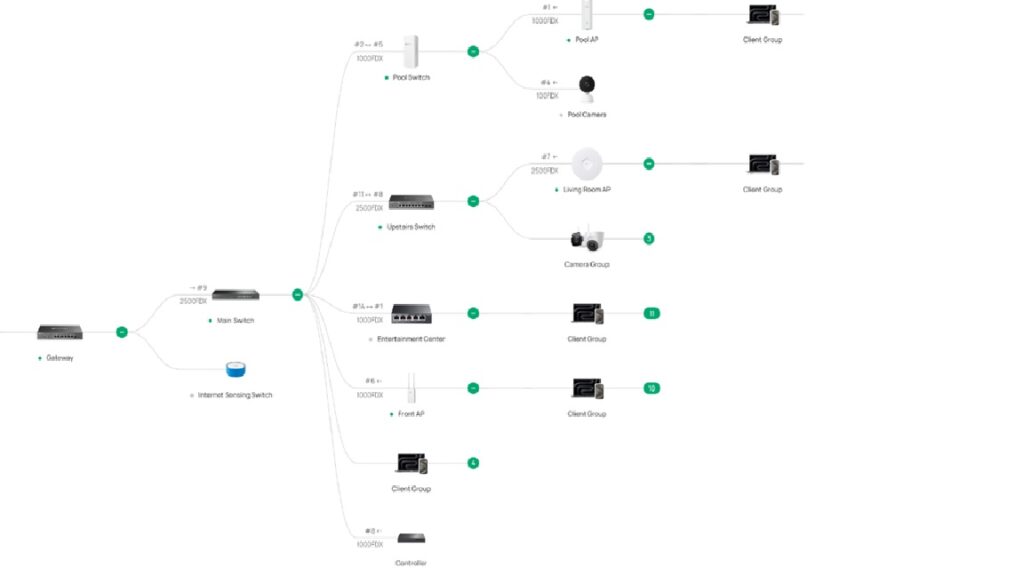
Now that that is finished, we needed to install the ACL’s and rules. The VLANs are:
- Trusted 10
- IoT Devices 30
- Servers 40
- Guest 50
- Cameras 60
- Network Infrastructure 90
So the rules are simple. This controller handles rules higher in the list as being higher priority. For that reason, you list exceptions first, and general rules second. With that being said:
- Permit Guest network clients to contact the printer
- Allow my Zigbee hub to contact the server (TCP only)
- Allow Trusted Devices to contact Infrastructure
- Allow Cameras to contact Server
- Allow Trusted Devices to call Server
- Deny Guest network to all other networks
- Dent IoT network to all other networks
- Deny Cameras to other networks
- Deny Cameras to Internet
- Deny other networks to Infrastructure
That is the network. I set the network up like this, and everything seems to have been working well for the past week. I am sure that I will add other rules as things go on, but that is what I have for now. Once a week, the entire contents of the server are encrypted and sent to a backup server that’s stored in the house of a friend. That way, I have a copy of everything important in the event I lose access to all of my data here. Since it’s the Internet, that person and my backup data can literally be anywhere.
Then I installed AdGuard, which is my own private DNS running on the server. It allows me to control which clients on the network can interact with my network. It lets me block malware, spyware, and all sorts of advertising. About 30% of the DNS requests originating from my house are things I don’t want phoning home.
There is a VPN built into the system that allows me to hide my traffic from as many people who don’t have reason to see it as possible.
Then the surveillance software went in. The software was Surveillance Station and is running on the Synology rack server. It is recording a single PTZ and several fixed cameras, all in 8mp. It’s been running for ten days and I haven’t even used 2tb of my 7.8tb of storage so far. I think I have plenty of recording time. My goal was for 30 days’ retention, but it looks like I will get more than 60 days out of it.
Then there is physical security provided by Home Assistant. That includes sensors for motion, doors and windows, as well as a link to my smoke detectors. Different events cause different actions. Motion in a give area causes Home Assistant to take a snapshot of the area through the nearest security camera and send it to my cell phone as a text message. It can remind me that I forgot to close the door on the way out, other things like that.
The best part is that all of it, every piece, is owned by me. Amazon doesn’t decide to send my camera video to the cops. My ISP and their DNS server doesn’t need to know what websites I frequent. My devices don’t need to be reporting to data brokers what happens in my house.
Is it foolproof? Nope. Will it stop nearly all of the bullschnozzle? probably. Will it stop a determined, talented electronic wizard? Probably not.
It’s still far better than what I had three months ago. Now you know why I did all of the posts about data mining.
3 Comments
hh475 · June 24, 2026 at 4:01 pm
I have some experience in network security, and was, for some years, a GIAC Certified Intrusion Analyst, though it’s not my primary interest. The analogy I use is vehicle security. Ultimately, there’s nothing you can do to stop a highly trained and experienced expert from breaking in and stealing your car. If that’s the goal, give it up.
You, can, however, make it harder. Each thing you do that makes it harder strips away one cohort of people who are trying to break in. You get rid of 60% of people who break into cars simply by locking that door. Will it stop someone with a hammer and a bad attitude? No. But it will stop all those people walking through the parking lot yanking on door handles. Add a big old steering wheel rod. Drop another 5-10% of the people trying to break in. Add an aggressive alarm system? Another 5%. Faraday bag for your car fob? Another 1%. And on and on.
Nobody will be able to stop the NSA from compromising them. The NSA can’t protect itself from the NSA (see: https://securityaffairs.com/194016/ai/anthropics-mythos-ai-broke-into-almost-all-nsa-classified-systems-in-hours.html ). But for each thing you do, you make the population who will have the expertise and determination smaller. And that’s a win.
The only caveat I’ve learned is that there’s a work and complexity cost that can be counterproductive. Every tool, firewall, etc. you deploy, you are adding a layer of complexity and another set of requirements for continuous upgrade, patching, etc. At some point, the mere weight of the tools can introduce its own vulnerability. The other thing I ran into, but which likely is not a problem for you and your family, is that the more security you add, the less convenient the system is to use. When I was doing this, I kept setting up these great security protocols and then immediately had users doing their best to get around them because of the inevitable usability/security conflicts.
Divemedic · June 24, 2026 at 6:13 pm
A good system is nearly invisible to the user. That what most of this is- the server is mapped on our computers as a drive. The Surveillance and alarm systems are easy to use apps. The private DNS system is invisible. I’ve worked hard to make it invisible when I can, and as easy as possible to use when it can’t be.
One of the nice things about Omada is that it is easy to upgrade because they are all made by the same manufacturer and controlled from one single app.
lynn · June 24, 2026 at 5:12 pm
That is a very impressive setup.
Comments are closed.