The employer claims that they weren’t tracking him, but his location just happened to show up on the supervisors screen. I’m betting that every employee’s location was known 24/7 with this app.
It looks like it was hardly ever fired. Wear is consistent with a pistol that had maybe a box of ammo put through it, then was put in a nightstand drawer and never fired again.
The match barrel has no wear on the bluing.
There is a 2mm scuff on the bluing near the top of the slide.
The bluing is warn around the top of the only factory magazine I have for it. The other magazine that shipped with the handgun is apparently missing.
The bluing is a bit warn on the outsides of both safety levers, and on the points at the front on both sides of the slide, as if the pistol spend a lot of time sitting in a drawer.
On the contact points of both sides of the grip safety, the bluing has rubbed off.
There is gunpowder residue on the feed ramp and the breech face. The bluing on the locking lugs is quite worn, but the lugs are in good shape.
Most of the bluing is still present on the face of the hammer.
The only thing that I can find wrong with it, is the tritium sights no longer glow, but that isn’t surprising since Para USA was absorbed by Remington in 2012, and the Para pistols were discontinued in 2015.
This thing is a boat anchor, I mean it is heavy, weighing in at 42.2 ounces with an empty magazine inserted. That makes it 10 percent heavier than a GI model. The guy wanted a good price, so I took it. I will get some new sights for it and then take it for a spin.
Here is the continuation of password security. So you have a password manager, which has some serious advantages:
You have secure passwords that are 12 to 20 characters long,
made up of upper and lower case letters, numbers, and symbols
are random(ish) by not containing dictionary words or their variants (like p@$$woRd)
You can have a different password for every online account, stored away in an easy to use and retrieve format
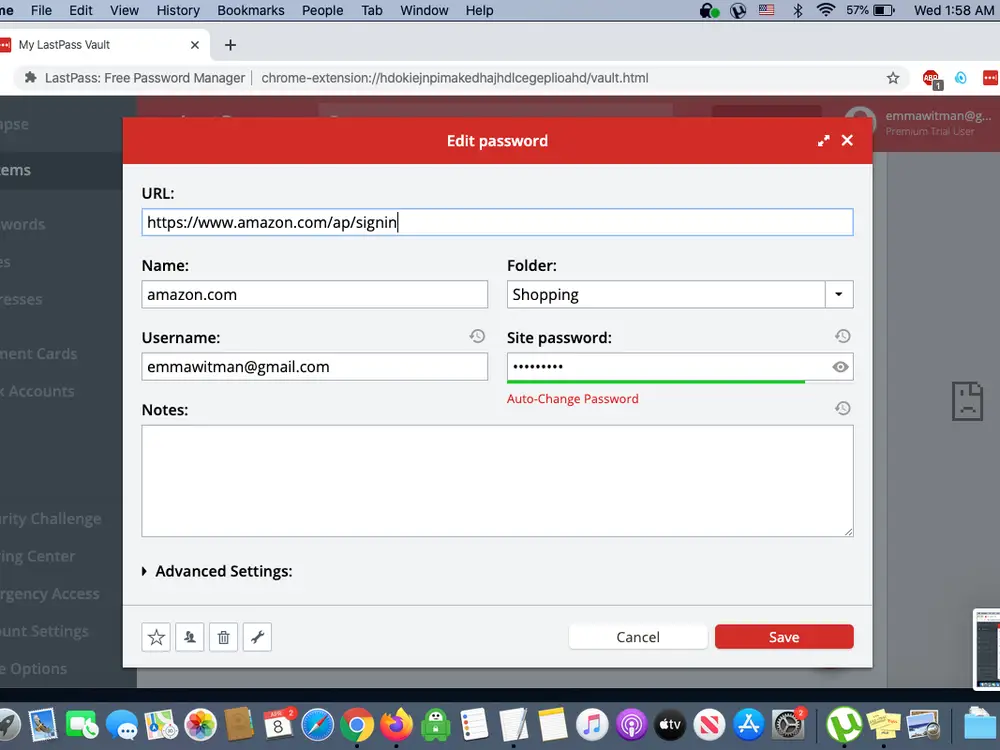
You can also store answers to challenge questions in your wallet. When the bank challenges you to name your third grade teacher, you can respond with “Mrs. Smith” or you can answer the challenge with a random string of characters stored in your password wallet. Look at the “notes” field (not from my real account or wallet).
This picture is from the Internet. It isn’t my account.
Down there in the “notes” section, I will put the challenge question and its answer. I always use the “generate random password” feature to generate a random password and use that as the answer to the challenge question. Good luck guessing that, hacker bitches.
All of your passwords are secure in your encrypted password wallet. Or are they?
LastPass was recently hacked, and a black hat used the credentials of an employee that was compromised in a phishing attack to gain access to and download their entire database of encrypted user files. I’m not blaming LastPass for that one- it could have happened to any company, and to their credit, at least they came clean and let everyone know.
This created two problems for LastPass users. Now that the black hats had the files, there are two ways that they can access them:
They can try to brute force the master password for the file. This is where a strong master passphrase works to your advantage. If you are smart, as soon as you learn of the breach, you change the most important of your passwords (master password, followed by bank and email accounts, then others) before they get a chance to guess the master passphrase. By the time they have your passwords, you have already changed them and it won’t matter.
Since LastPass encrypted file doesn’t encrypt the websites, only the login, password, and notes, the weakness here is that the black hat can do a targeted fishing attack similar to what was done to this Australian woman or this woman who was targeted by a man claiming to be a Chase fraud investigator. These attacks can be quite convincing.
To guard against someone compromising some or all of your passwords, you can use Multifactor Authentication (MFA). All MFA is, is a second way of ensuring that the person who is accessing an account is the authorized user. The most common of those is sending a code by SMS. You enter your password, then you get a prompt to enter a code or pin that’s sent to your phone number. After you type in the code, you’re in. Simple, right?
This is because SMS messages rely on the security of phone networks and phone companies. Both, sadly, are notoriously easy to access. While some text messages are encrypted user-to-user – think iMessages between iPhones or WhatsApp messages – SMS messages are in plain text form. Plain text messages are not encrypted between sender and receiver, so if attackers can intercept the message, they can read the content. Unfortunately, SMS messages are easy to intercept. Even Microsoft is advising people to stop using SMS as a method of MFA.
It’s time to start your move away from the SMS and voice Multi-Factor Authentication (MFA) mechanisms. These mechanisms are based on publicly-switched telephone networks (PSTN), and they are the least secure of the MFA methods available today. That gap will only widen as MFA adoption increases attackers’ interest in breaking these methods and purpose-built authenticators extend their security and usability advantages. Plan your move to passwordless strong authentication now – the authenticator app provides an immediate and evolving option.
Alex Weinert of Microsoft
Don’t rely on just a password. Don’t rely on one password. There are tons of scammers out there who want access to your stuff. Keep it as secure as you can make it.
The authenticator app still relies on you being in possession of your cell phone, and in my opinion creates a single point of failure- the loss of your phone, that places both the password wallet and the means of MFA in someone’s possession.
I don’t worry about the three letter agencies getting my stuff. If they want it, they are going to get it. They don’t need to steal my passwords, they aren’t going to spoof my phone, and they aren’t going to use my IOT devices to spy on me. You know what they are going to do? Present a national security letter to my bank, my employer, Google, my ISP, and anyone else they feel like, and the companies involved are going to tell them anything they want to know.
The purpose of the security I am writing about is protection from scammers who aren’t the government.
Still, there will be a future post on MFA, since this one is getting a bit long. On a side note, this series of posts represents my ongoing research into ways for securing my information. I tend to research and look into things that I am adopting. I figure that you can benefit from my research efforts.
Finally, respondents point to the slight uptick in gun regulation during the late-19th century. As the Court suggested in Heller, however, late-19th-century evidence cannot provide much insight into the meaning of the Second Amendment when it contradicts earlier evidence. In addition, the vast majority of the statutes that respondents invoke come from the Western Territories. The bare existence of these localized restrictions cannot overcome the overwhelming evidence of an otherwise enduring American tradition permitting public carry. See Heller, 554 U. S., at 614. Moreover, these territorial laws were rarely subject to judicial scrutiny, and absent any evidence explaining why these unprecedented prohibitions on all public carry were understood to comport with the Second Amendment, they do little to inform “the origins and continuing significance of the Amendment.” Ibid.; see also The Federalist No. 37, p. 229. Finally, these territorial restrictions deserve little weight because they were, consistent with the transitory nature of territorial government, short lived. Some were held unconstitutional shortly after passage, and others did not survive a Territory’s admission to the Union as a State. Pp. 58–62.
New York State Rifle & Pistol Assn., Inc. v. Bruen (06/23/2022)
The team will be sending him to see a cardiologist before allowing him to return to play. Twenty year old collegiate athletes don’t typically collapse from idiopathic cardiac events. Granted, there is no evidence either way as to his vaccine status, but it would certainly be something to keep an eye on.
The pro vaccine folks are already calling it fake news because it isn’t like the collapse of Hamlin, but in my opinion the fact that it isn’t like the collapse of Hamlin is exactly WHY it needs to be looked at.
To continue my examination of passwords, we have already seen how to generate them. Now that we have spent all of that time coming up with a password that is hard for someone to guess, we need to be able to use it while keeping secure. How do we make them user friendly and accessible while at the same time ensuring that they are secure from prying eyes?
Once you have generated your password, you need to remember it. Anyone can remember a few secure passwords, but remembering a bunch of them becomes problematic, especially when they are secure and change every few months, as they should.
The use of password memory devices like license plate numbers, or children’s birthdates, or whatever other memory devices you may use has two different drawbacks- the number of passwords that you can remember like that will be limited, and will also be difficult to keep straight across a large number of accounts. I tried that method, and it fails when you begin getting a large number of them.
My password wallet has over 300 unique passwords stored in it. Some of them, like for bank and email accounts, are 20 characters long and change twice a year. Others, like for commenting on Disqus, are 12 characters long and may change every two or three years. That’s a lot of remembering. I simply can’t do it.
So how do we store our passwords? I used to use one common password for bank accounts, another for email accounts, yet another for blogs, etc. What this means is that you are running the risk of a data breach at one company exposing your passwords for others. Not ideal.
You can keep them off of all computers and just do what my mother in law does. She keeps a notebook with all of her passwords written down in it. Then what? Do you carry it around with you? What if you lose it? How do you constantly update it? Not convenient, not secure.
One big security hole for passwords is your spellchecker. Your spellchecker has a list of words that are spelled correctly, and compares that list to the words that you are typing. If there is not a match, it marks a ward as misspelled and may even suggest the correct spelling. Some systems will even automatically insert the word that is a likely match. Users add new words to the spellcheck dictionary by telling the system that the word is correctly spelled, then the software adds the new word to the dictionary.
What if that new word isn’t a word at all, but is instead the password to your bank account? Spellcheck dictionaries aren’t secure at all. The spellchecker simply marks the passwords as being correctly spelled by saving them to the dictionary. The two Internet browsers that are most notorious for this are the “enhanced spell check” feature found in Chrome’s settings or the browser extension “Spelling & Grammar Checker” for Microsoft Edge. Huge security problem there.
You can let Google store them for you, but that isn’t a great idea. Do I really need to explain why?
So we are left with password storage companies. If we want our passwords to work across multiple platforms- at home, on our cell phones, at work, and everywhere else where we use it, there are only a couple of ways to do that. We can transfer it from platform to platform manually, or we can allow the password wallet to be stored on another person’s system.
These systems have advantages- we can store a large number of complex passwords in a format that makes them readily available. The password list is more secure than writing them down, and since the password storage company stores the password file in an encrypted format with the decryption key being your master password, you now only have to remember the master password. For those of you who have a trick for memorizing a password, here is where you shine. You can use the license plate numbers of your last three cars, your kids’ birthdates, and other mnemonics to come up with a secure passphrase that is easy for you to remember, but hard for a black hat to guess, and use that to secure your password wallet.
The risk here was displayed by LastPass recently. A password companies files can be compromised, and the black hats are now in possession of your encrypted passwords. They can now brute force your master passphrase at their leisure and get your passwords.
This post is already long, so we can discuss this in a later post.
Speaking of expensive hobbies. One of the things that I do to stay busy is work on making my house a smart house. It all began about 8 years ago, when I installed a SmartThings hub. Our house is automated. I use our cell phones as presence sensors, and the house changes modes when we leave, come home, and go to bed.
My wife was very understanding, and has now come to love the automated features of the house. When we go to bed, the thermostat changes to make the house cooler, the lights turn off, and the smart locks on the doors all lock themselves. The landscaping lights change colors depending on the season. There is purple, gold, and green for Mardi Gras; Red, white and blue for Independence Day, that sort of thing. The hot water heater turns off when we go to bed or leave the house. It’s geeky, fun to do, and pretty bad ass.
But 8 years has gone by, and technology is evolving. I have always been bothered by the fact that SmartThings is a cloud based processor. I want local processing, and now that we are thinking about moving next fall, I have a chance to try it.
I am thinking of switching to Home Assistant. I just bought an Odroid N2+ processor and a 128 GB eMMC card to use as a server. Now I am going to learn how to program it and integrate it with all of the devices I am planning on using. So I will spend the next few months playing with it. I am planning on using smart switches that can control scenes as well as individual lights.