Getting ready for the Zombie Apocalypse is sexy to preppers. However, the complete collapse of all society is not the most likely disaster we will face. More likely, our own personal prepping scenario will be a more personal one. For that reason, it’s important that we keep our minds on what is most likely and not the most expansive.
Computer nerd information coming:
So I spent the morning cobbling together an interesting little project to increase security here. I setup my main server to put together a stream of the four cameras covering the most likely approaches to the house, and combine them into a 2×2 stream that it makes available at a certain IP address on the home’s internal network.
Then I attached an Odriod N2+ that I had lying around to one of the HDMI ports on the main TV. Now when anyone watching TV selects that HDMI input, they see a live stream of the main approaches to the house. Security has been increased, as I can do an instant live view of the home’s outside, thus allowing me to see my security perimeter without having to expose myself to the view of anyone outside.
It was a simple project that cost me nothing, as I already had the Odroid lying around. I bought this four years ago at a cost of $165 to do another project that never panned out, so it was lying in one of my tubs full of leftover stuff that I might use someday.
I installed Linux on an old 32gb Micro SD, then installed the appropriate software on it. On the server, I set up a Docker Container and had it pull the streams from the appropriate cameras and create a composite stream. Now I can sit here and watch the four cameras from my television.
Now I have to get back to the honey-do list item of installing a closet system in the bedroom we converted to a gym. I’m almost done with that, and I have procrastinated enough.
I’ve been asked why I don’t just use Cat6 cable in my network upgrade. Here is why:
Thirty years ago, I still had dialup Internet. My first internet was a 9.6 kbps connection around 1992 or so. I remember thinking how fast my 56 kbps connection was when I got that just a few years later. I’m sure you all remember it taking hours to download a single picture. Then Time Warner started offering their “Road Runner” high speed broadband service in 1999, boasting speeds of up to 1.5 Mbps. Now here we are, 26 years later, and I have available Internet speeds of up to 1.2 gbps, nearly 22 THOUSAND times faster than it was just 30 years ago. Now word comes that we are about to get fiber Internet within the next year, and they are offering speeds of up 8 Gbps.
When I was a kid, my Dad, who you may remember was an engineer for Hewlett Packard, told me that no one needed a hard drive larger than 10mb. Why, he told me, 10mb could hold the text of every book within the Library of Congress. The computer (the HP computer he brought home was an early DOS machine built into a suitcase) had all the storage anyone could need, he predicted.
He was wrong. A corollary to Moore’s law, Internet speeds have historically doubled about every 2 years or so. With that in mind, I set out to build a home network that would anticipate these advances. Sure, I have 1GB speed now, but in a year it will likely be 2 GB. Within a decade, I would be looking at 32 or even more Gbps.
The network traffic between devices in a home can be even higher than that. In 2015, 1 Gbps was the usual home switch speed. Today, 1 Gbps remains the mainstream baseline, with 2.5 Gbps becoming a common upgrade. Sure, my computer may only be capable of 1 gbps, but what happens when there are multiple computers, streaming televisions, and IoT devices? All that traffic adds up, and you can soon overload a network.
The maximum speed we will ever get out of Cat 6 is 10gb. A couple of years, and a home wired with CAT6 will be obsolete. I’m not getting any younger, and I wanted to have a system that wouldn’t require a ton of work when I eventually get too old to climb up in the attic.
So with that in mind, I designed my home network. There were some initial observations:
Internet enters my home via coaxial RG-6 cable.
It travels through the walls and attic to the utility room, where the modem is located
The modem has a maximum of 1 gbps
from that utility room, there are 5 CAT6 cables that travel to various parts of the house
My old system was a WiFi mesh and wasn’t capable of speeds I wanted
I noticed that I was paying for gigabit Internet, but speed testing showed I was only getting 300mbps or so, sometimes less. I plugged my computer directly into the modem, and was getting over 800 mbps. My network was the bottleneck. I was also having Internet connection issues. At first, I was just trying to clean up my WiFi, then I decided to redesign the entire network. I envisioned using CAT6 Ethernet cables to haul up to 2.5 gbps from clients to switches, and 10gbps connections from one switch to another, and to the server I was using. That would allow all of those 2.5 gbps connections to come together and not bottleneck at the switches.
So after over 7 months of work, this project is coming to a completion. The holdup has been the cost of buying the equipment. The server and its hard drives were the most expensive segment at a cost of about $3200, and the rest of the project cost about $4700, but that includes the Home assistant stuff and the cameras. All told, this project came in at just under $8,000 for everything.
I decided to use LC fiber optic cable, because those cables are capable of up to 40 gbps, even if the switches I have aren’t capable of that. Yet.
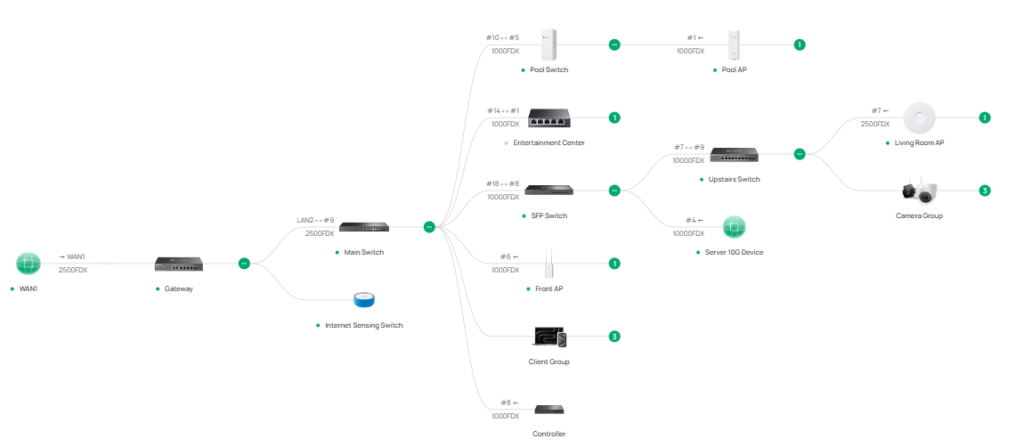
So my network looks like this:
There are a couple of single gigabit switches, but they supply a television or some Internet speakers, and those don’t need any more bandwidth than that. One of the switches is a 10gbps SFP switch, and the others are 2.5 gbps with 10gbps uplink connections. The only remaining choke point is my ISP, the 1 gigbit modem, and the gigabit router. Once fiber comes in, I can replace the router and connect to the fiber ONT, and I will have a fully capable 2.5gbps network that can easily be reconfigured to 10gbps. The wires will already be there if I want to transition even higher at some point.
Now that the Network is secure and there is video surveillance around the property, it’s time to add more software to enhance security. Part of the software install was to add Home Assistant. For now, I am using it to notify my wife and me of certain events:
Fire, though a Z Wave tie to the some detectors
Security while we are not home- every door and window has a sensor and opening them will set off the alarm and notify us. It also takes a snapshot of the door that is open (through the closest security camera) and attaches it to the message.
Security at night- opening outside doors or windows will notify
Status report- every time we leave the house and every night, the house sends a status report that notifies us of any abnormal conditions in the house
The system also controls the water heater through a smart switch, turning it off when we are not using it
It also warns us of water in areas where it shouldn’t be, temps too warm in the freezer, and other anomalous data
I’m not going to be doing many automations for now- mostly notifications.